Automate Sales Follow-Up Emails: Google Meet & Gemini Guide
Learn how to use Google Meet, Gemini, and nudge to automate sales follow-up emails in 2026. Stop losing deals to administrative dread and manual data entry.
Automate Sales Follow-Up Emails from Google Meet & Gemini
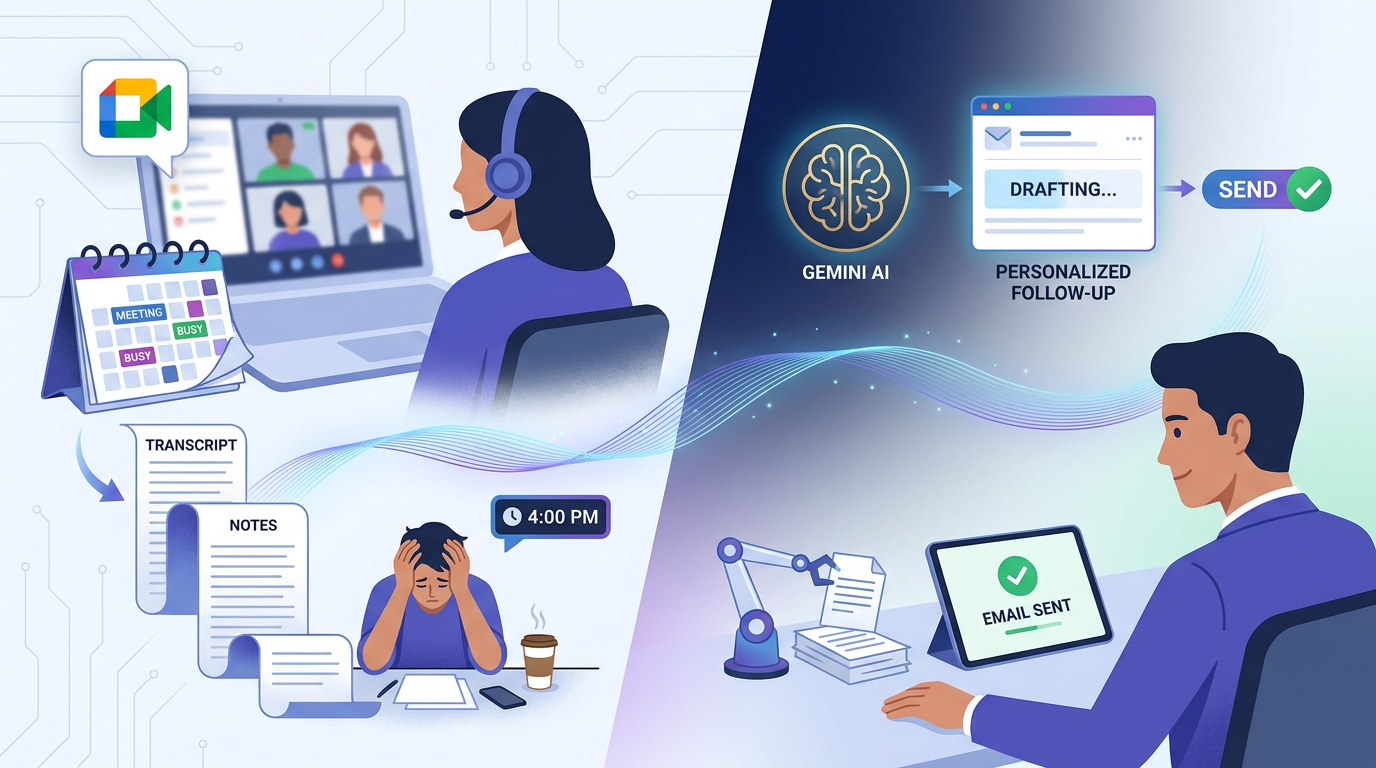
It’s 2026, and the "founder-led sales" model is more prevalent than ever. You’ve just hopped off a 30-minute Google Meet call with a high-stakes prospect. The chemistry was great, they asked intelligent questions about your pilot program, and you promised to send over the revised SOC 2 documentation and a custom pricing tier by Thursday.
But then, the "real world" happens. Your 11:00 AM meeting starts immediately. Then a Slack fire breaks out. By 4:00 PM, those specific verbal nuances from the morning call have faded. You know you need to follow up, but the friction of opening a blank doc, hunting through a 4,000-word transcript, and drafting a personalized email feels like a mountain you don’t have time to climb.
This is where most deals die—not in the meeting, but in the silence that follows. If you are looking for an app that drafts follow-up emails from Google Meet notes, you aren’t just looking for a template; you’re looking for a way to bridge the gap between "great conversation" and "closed deal."
The Follow-Up Failure: Why Great Meetings Die in Your Inbox
In the fast-paced business landscape of 2026, momentum is your most valuable currency. Yet, founders and small business owners consistently face the "post-meeting slump." You leave a Google Meet call energized, but that energy quickly turns into administrative dread.
Manual follow-up is a friction-filled process that often results in missed opportunities. It requires:
- Context Switching: Moving from your video platform to your notes, then to your CRM, and finally to your email client.
- Synthesis: Re-reading transcripts to find the three "nuggets" of information that actually matter.
- Commitment Tracking: Staring at a blank Gmail draft trying to remember if *you promised the case study or if they* promised to introduce you to their legal head.
The result? Follow-ups are sent three days late, feel generic, or—worst of all—never get sent. Research shows that deals close on persistence, but persistence is impossible without a system that handles the "thinking" for you. For a deeper look at the landscape of these technologies, check out our comprehensive guide to AI tools to draft follow-up emails from transcripts.
The Power Duo: Capturing Sales Intel with Google Meet and Gemini
Google has made massive strides in 2026 with its integrated AI. The Gemini Note Taker within Google Meet is now a standard tool for modern sales teams. It does the heavy lifting of capturing high-quality raw transcripts and providing a high-level summary of the call.
However, Gemini often has a "last mile" problem. While it's excellent at summarizing a conversation, it doesn't always understand the *velocity* of a sales deal. Gemini provides data, but it doesn't:
- Manage your "action plan" across multiple customers.
- Understand who owns a task (you vs. the prospect).
- Follow through to ensure a task is marked "done" once an email is sent.
To turn raw Gemini notes into revenue, you need a workflow that doesn't just store information, but activates it. You need a system that takes that raw transcript and automatically prepares the outreach for you.
Nudge: The Missing Link for Automated Sales Follow-Up Emails
This is where nudge—the "un-CRM"—comes in. Nudge isn't another bloated database with 50 required fields and a pipeline view you’ll never look at. It is an action-oriented engine designed specifically for founders who have quit other CRMs because they were too much work.
Nudge acts as the intelligent layer on top of your Google ecosystem. It integrates directly with Google Drive and Gemini, pulling in your notes and transforming them into a living customer page.
The "magic" of nudge lies in its AI action extraction. Instead of just giving you a "summary" (which you still have to read and interpret), nudge identifies specific commitments. It sees the sentence, *"I'll send the updated MSA by Friday," and automatically creates a dated task for you. It sees, "We will review the pilot internally and get back to you,"* and creates a tracking task for the customer.
Step-by-Step: Turning Transcripts into Ready-to-Send Drafts
Using nudge as your app that drafts follow-up emails from Google Meet notes turns a 20-minute chore into a 20-second review. Here is how the workflow looks in 2026:
1. The One-Click Import
After your Google Meet ends, your Gemini notes are saved to Google Drive. In nudge, you simply hit "Import." Nudge pulls the transcript directly from Drive or allows you to paste it in. There’s no manual entry and no "data cleaning" required.
2. Review the Auto-Extracted Action Plan
Nudge instantly parses the transcript. On the customer’s dedicated page, you’ll see a list of next steps, grouped by owner (Mine vs. Customer) and assigned suggested due dates based on the verbal context of the call.
3. Generate the Email Draft
This is where the power of the "un-CRM" shines. Based on the extracted actions and the context of the conversation (e.g., "they are worried about the June 1st launch date"), nudge generates a personalized email draft. It doesn't use a generic "Thanks for the time" template; it references the specific blockers, the vision discussed, and the concrete next steps.
4. Review and Send via Gmail
Nudge doesn't send emails behind your back. It presents the draft for a quick sanity check. With one click, the draft is opened in Gmail. You hit send, and the deal is officially moving forward while the conversation is still fresh in the prospect’s mind.
Beyond the Draft: Maintaining Follow-Through Discipline in 2026
The follow-up doesn't end when the first email is sent. In fact, most deals are won in the third, fourth, or fifth interaction. Nudge is built for this long-term persistence.
Gmail Auto-Tasks
Once you connect your Gmail to nudge, the system becomes a silent partner in your inbox. When you send that follow-up, nudge watches the thread. If the customer replies with a new question, nudge automatically creates a new task. If the customer says, "Looks good, let's move forward," nudge recognizes the commitment was met and auto-closes the task. No more manual status updates.
The Living Customer Page
Instead of digging through 20 different email threads and three different Google Docs, nudge builds a unified history for every account. You get a "one-glance brief" that synthesizes:
- Where we are: Current stage (e.g., Moving toward pilot).
- Stakeholders: Who needs buy-in.
- Blockers: What is stalling the deal (e.g., AI sensitivity or budget cycles).
- Next Steps: The vital questions to ask in the next call.
Why Founders are Switching
The era of the "system of record" (traditional CRMs) is being replaced by the "system of action." Founders in 2026 don't want to manage a pipeline; they want to manage their momentum. Nudge is the first tool that effectively treats sales follow-up as a task management problem rather than a data entry problem.
By automating the "thinking" behind the follow-up, nudge ensures that you are the founder who always delivers on their promises—the one who never lets a deal die in silence.
Frequently Asked Questions
Can nudge handle transcripts from tools other than Google Meet?
Yes. While nudge integrates seamlessly with Google Drive and Gemini Note Taker, it also supports direct imports from Granola, Fireflies, and manual transcript pastes. It is built to work with whatever note-taking stack you already use.
Does the AI work if my notes are messy or shorthand?
Absolutely. Nudge’s AI is designed for "fuzzy" logic. It doesn't need perfect grammar or structured bullet points. It uses context to understand intent, meaning it can extract action items from even the most chaotic "stream of consciousness" notes.
How does "Auto-Close" work in Gmail?
When you sync nudge with Gmail, it tracks specific threads associated with your customers. If a thread indicates that a task has been completed (e.g., "I've attached the signed MSA"), nudge uses AI to match that intent to your task list and closes it automatically.
Is my data secure?
Nudge is built for business sales, which often involves sensitive information. Nudge utilizes enterprise-grade encryption and adheres to 2026 data privacy standards, ensuring that your transcripts and customer data remain private.
Ready to stop losing deals to your inbox? Try nudge for free — The un-CRM that turns your meeting notes into actions. No credit card required. Experience the power of sales follow-up that actually works the way you do.